What a dojo's email looks like, who it is from, and how it survives an inbox in dark mode.
Part of the Konjo design language. The laws in the spine apply here unless this chapter contradicts them.
Kata (2026-09-29). A dojo's email is from the dojo only, with no Konjo mention beyond the unsubscribe footer the law requires; light and dark get equal parity; the type is Archivo (interview, co-branding and colour).
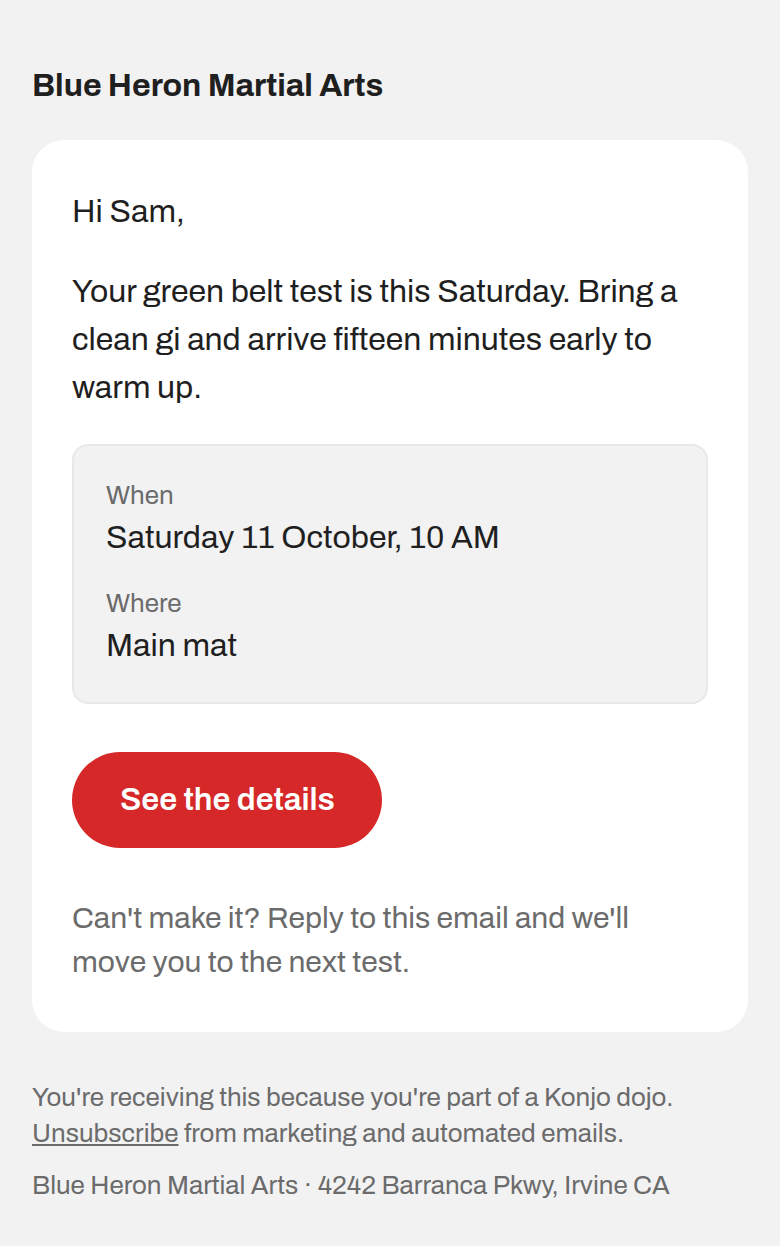
An email is the one Konjo surface the person did not open on purpose. It lands next to their bank, their kid's school and forty newsletters, and it gets about two seconds. In those two seconds it has to say who it is from and what it wants. Everything else on this page exists to protect those two answers.
What it looks like
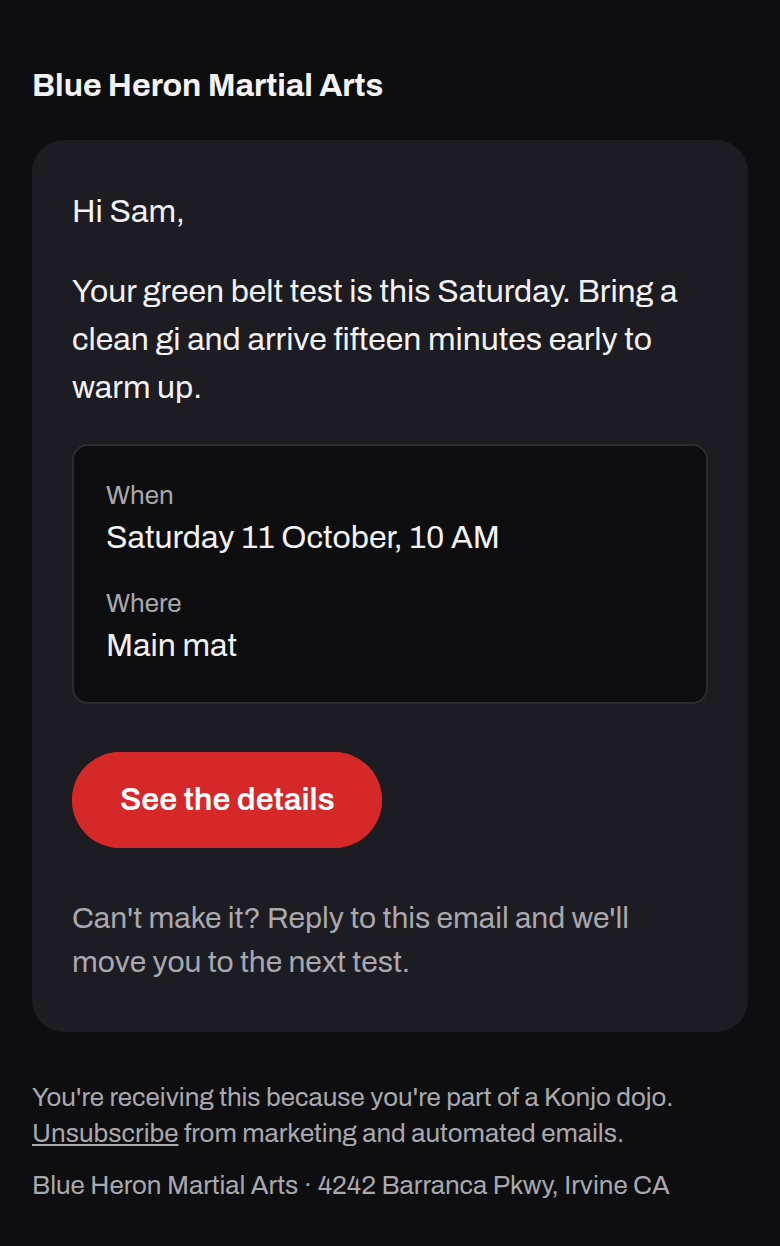
A dojo's email, light and dark, rendered from the layout at 390px:
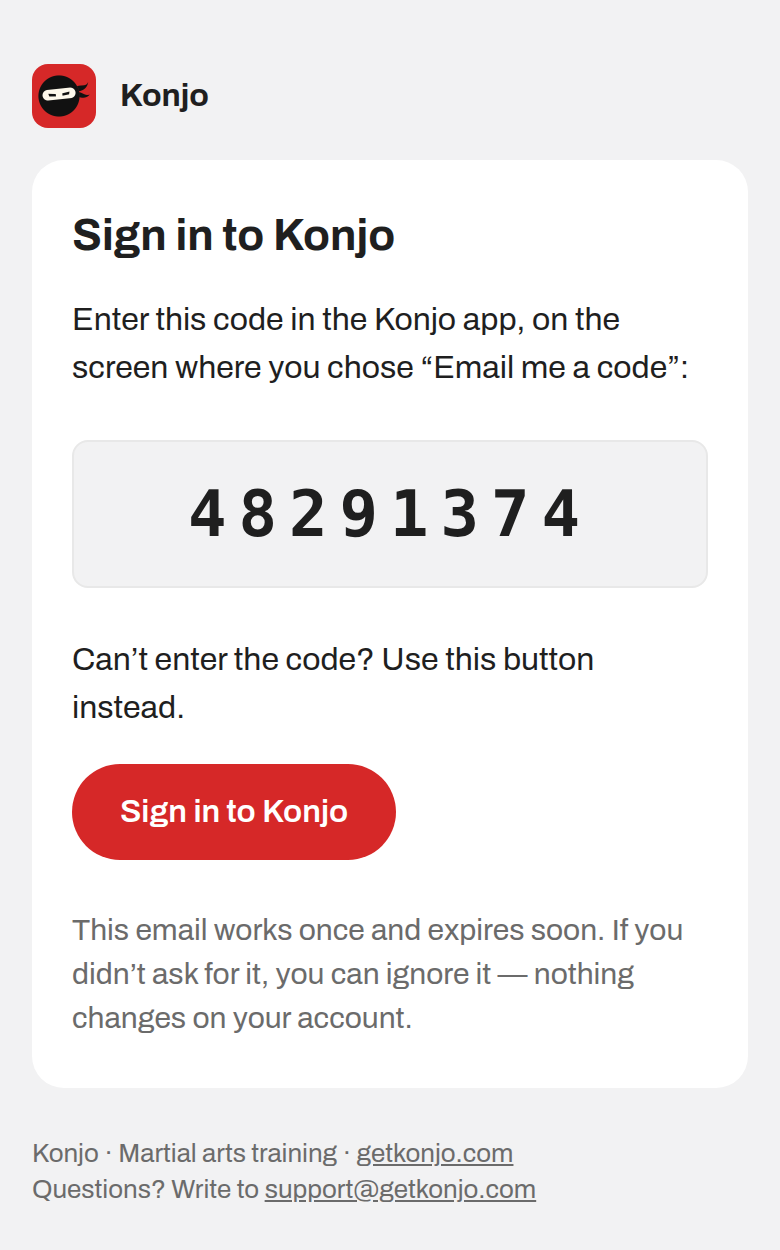
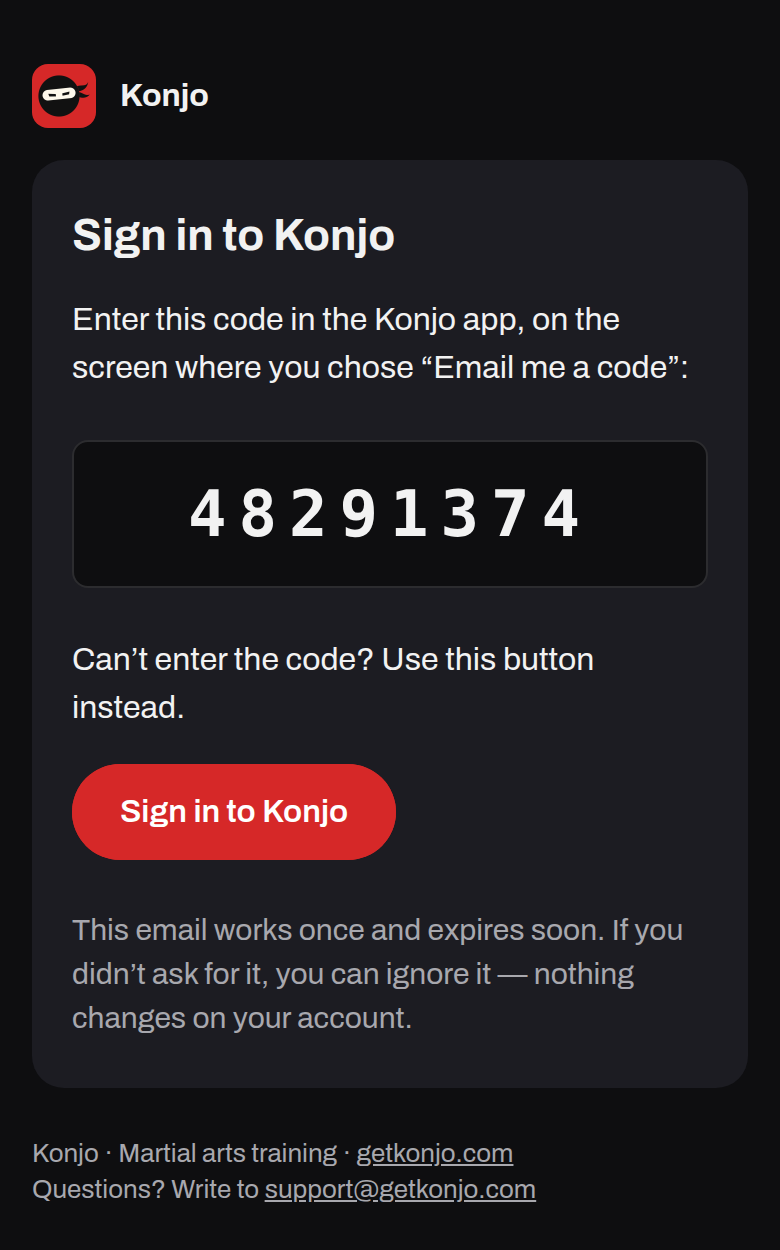
Konjo's own sign-in email, light and dark:
Rendered by renderDojoEmail() and by the auth templates through Go's html/template, the way
Supabase renders them. Gmail and Outlook draw these differently; see dark mode.
One layout, generated
Every HTML email goes out through one helper,
emailLayout.ts. Nobody writes an email
shell by hand.
- A dojo's message (a blast, an automation, a reminder, a receipt) is sent by
brevo-send, the single drainer ofcomm_messages.renderDojoEmail()wraps it at send time, around the stored body. - Konjo's own account mail (sign in, confirm, invitation, password reset) is sent by
Supabase Auth.
renderAuthLayout()wraps it, rendered intosupabase/templates/_layout.htmlbynpm run design:sync.
The colours are generated too: emailTokens.generated.ts
is written from packages/design-tokens/tokens.ts by
sync-email-tokens.mjs, which also computes
every text pair in both themes and refuses a palette that fails AA. npm run design:check
fails if either file is stale, or if an auth body template prints a hex that is not in the
palette.
A stored message body is a fragment, not a document: <p>Hi {{first_name}},</p>…. The
layout wraps it at send time, so changing the layout changes every email at once and no
migration has to rewrite a template. A body that is already a whole document (<html>) is
sent as written. A text-only message stays text-only.
Who it is from
| From | Header | Footer | |
|---|---|---|---|
| A dojo's | The dojo's name as the sender name ("Unity Dojo") | The dojo's logo and name | Why you got it and Unsubscribe (marketing and automations only), then the dojo's name and public address |
| Konjo's account mail | Konjo | The head mark (32px, radius 8) and "Konjo" | Konjo's support address |
- The dojo is the sender. Members joined a dojo, not a software company. The sender name is the dojo's; the address underneath stays Konjo's authenticated sending domain, because that is what keeps the mail out of spam. A row with no dojo falls back to "Konjo Support".
- No Konjo branding on a dojo's email. No logo, no "Sent with Konjo", no "Powered by". The interview puts that credit on public web pages only. The single exception is the unsubscribe sentence ("…part of a Konjo dojo"), which says who is processing the address.
- Account mail is Konjo's, because the account is. A sign-in code is not a message from a dojo, and dressing it as one would teach people to trust mail that names their dojo and asks for a code.
- Name, logo and address only. The co-branding decision allows a dojo its name, logo and cover photo. Email takes the first two; a cover photo is a large image, and a large image is what an inbox blocks first.
Anatomy
(hidden preheader)
[logo] Unity Dojo
┌─────────────────────────────┐
│ Headline, if one is needed  │
│ One message. Short          │
│ paragraphs.                 │
│ ┌ details ────────────────┐ │
│ │ When                    │ │
│ │ Saturday 11 Oct, 10 AM  │ │
│ └─────────────────────────┘ │
│ ( See the details )         │
│ The quiet note              │
└─────────────────────────────┘
Why you got this. Unsubscribe
Unity Dojo · 4242 Barranca Pkwy
From the top:
Sender header: 16/700, on the page.
Card:
surface.card, radius 16, padding 32 (24 by 20 at 480px and under).Headline: 22/28, 700,
text.primary.Message: 16/24, 400, paragraphs 16 apart.
Details: an inset of
surface.pagewith a 1pxborder.hairline, radius 8. Label 13/18 intext.secondary, value 16/24.Button: one filled pill, 48 tall.
Quiet note: 15/22,
text.secondary. For the expiry, or "ignore it".Footer: 13/18,
text.secondary, on the page.The preheader is the line an inbox shows after the subject. It is taken from the message's own first words, never written separately. Without one, the inbox previews the dojo's name twice.
The sender header sits on the page, above the card, the way a receipt names the shop. It is never a link: the card carries the one action.
One white card on the tinted page,
surface.cardonsurface.page, radius 16. No shadow and no border. The card holds the message and nothing else.One message per email. If it has two things to say, it is two emails or one of them is in the app.
The details card is for facts someone will look back for: a date, a place, an amount. It is an inset in
surface.pagewith a 1pxborder.hairline, inside the white card. Labels above values, never a two-column table that breaks at 375px.The footer is on the page, not in the card, so it reads as the envelope rather than the letter.
Width is 560 at most, with 16 of page either side. At 375px the card keeps a 16 gutter and its padding drops to 24 vertical and 20 horizontal.
The button
The same primary the app ships (buttons): a pill, 48 tall, brand.red with a
brand.onRed label in 16/600. In email it is a bulletproof table button: the red is on the
table cell and the link, the height is 12 + 24 + 12 of padding, and the label is live text,
never an image.
import { emailButton }
  from '../_shared/emailLayout.ts';
// href is already escaped
emailButton(href, 'See the details');
- At most one per email. A second action is a text link in
accent.red. - Red means "tap here" and nothing else. No red header band, no red rule, no red headline. The old account-mail layout had a red band across the top; Kata retired it.
- The link under the button stays. A button can be blocked or broken by a client; the plain link beneath it ("Can't enter the code? Use this button instead") is the fallback.
Type
Archivo, then the system faces:
Archivo, -apple-system, 'Segoe UI',
Helvetica, Arial, sans-serif
The layout loads Archivo from Google Fonts with @import inside the <style> block. Apple
Mail and iOS Mail honour it; Gmail and Outlook do not and fall back to Helvetica, Arial or
Segoe UI. That is fine: the hierarchy is carried by size and weight, which every client keeps.
A code that is read character by character uses the mono stack. Display type (Archivo
ExtraCondensed) is not used in email, because a fallback face at a condensed size reads as a
mistake.
Sizes come from the app's scale: title 22/28 for a headline, bodyLarge 16/24 for the
message, body 15/22 for the quiet note, caption 13/18 for the footer and detail labels.
Nothing under 13.
Spacing
The app's ramp, 0 2 4 6 8 12 16 20 24 32 40 48 64 80, and nothing else. Page padding 32 above
and below, 16 either side; 16 from the header to the card; card padding 32; paragraphs 16
apart; 24 above and below the button; 24 from the card to the footer; 8 between footer lines.
Dark mode
Both themes are designed. The light palette is written inline, because that is all Gmail
web and Outlook desktop read. The dark palette is the app's darkColors, applied by class
inside @media (prefers-color-scheme: dark):
| Role | Light | Dark |
|---|---|---|
| Page | #F2F2F3 | #0E0E10 |
| Card | #FFFFFF | #1C1C22 |
| Text | #1F1F1F | #F2F2F2 |
| Quiet text, footer | #6B6B6B | #A8A8AE |
| Link | #C42020 | #FF5252 |
| Button | #D62828 | #D62828 |
| Button label | #FFFFFF | #FFFFFF |
The light column is surface.page, surface.card, text.primary, text.secondary,
accent.red, brand.red and brand.onRed, in that order.
- Declare it.
<meta name="color-scheme" content="light dark">andsupported-color-schemes, or Apple Mail inverts the light palette itself. - Outlook.com and the Outlook apps recolour by their own rules and tag what they touched
with
data-ogsc/data-ogsb; the layout pins the same dark palette through those attributes. - Gmail's apps apply their own inversion and ignore the media query. Nothing can switch that off; the palette is chosen so the forced result is still legible, and the red button survives because its label is white in both themes.
- No pure-white images. An image with a white background is a white rectangle on a dark
card. The dojo's logo is the one image, and it sits on its own 40px white tile with radius 8
in both themes, because a logo was drawn for a white background and a dark one can vanish on
the dark page. Account mail's one image is the head mark, 32px with radius 8, which brings
its own red square and so needs no tile. It is served by the marketing site, so
scripts/auth/email-templates.mjsrefuses to apply the templates until it is live. - No conditional comments. Supabase renders auth templates with Go's
html/template, which strips HTML comments, so<!--[if mso]>would be deleted. Outlook desktop therefore draws the card full-width with square corners. That is the accepted cost.
Contrast
Computed by the generator, not eyeballed; it fails design:check if any pair drops under AA.
text.primaryonsurface.cardis 16.48:1 in light.accent.redonsurface.cardis 5.87:1 in light and 5.31:1 in dark.brand.onRedonbrand.redis 5.00:1 in both themes.- The footer sits on the page, so it is judged on the page:
text.secondaryonsurface.pageis 4.76:1 in light and 8.15:1 in dark.text.tertiaryis card-only and is never footer text. The old footer was 12px #888888 on white, under AA; it is gone.
Words
The voice is the app's. The subject leads with the thing, not the dojo (the sender name already says who). No exclamation marks outside a real celebration, and a birthday is one. Use the dojo's words: dojo, belt, rank, class.
Merge tags ({{first_name}}, {{dojo_name}}) are filled in memory at send time and never
written back. A template has to read correctly when a tag is empty: "Hi ," is the failure.
Every email also needs
- A plain-text part. It is what screen readers, watches and spam filters read first, and it carries the same unsubscribe line as the HTML footer. A message that has only HTML is not finished.
- Unsubscribe on everything that is not transactional, in the footer and as one-click
List-Unsubscribeheaders. A receipt, a waiver request or a class reminder someone booked is transactional and carries no unsubscribe. - The dojo's postal address in the footer of anything commercial. It comes from the dojo's public address; a dojo without one sends with its name alone.
- No tracking pixel. Konjo cannot say a message was opened, and the delivery vocabulary does not claim it.
- No
data-hooks or test IDs. Email has no test harness that reads them; the layout tests and the auth template tests assert on the rendered HTML instead.
Never
- Konjo branding, a "Sent with Konjo" credit or the Konjo head mark on a dojo's email.
- A red header band, a red headline or any red that is not the button or a link.
- More than one filled button.
- A hand-written email shell, or a hex typed into one.
- A white image, or text set in an image.
- Footer text under 4.5:1 on the page it sits on.
- An HTML email with no plain-text part.